Čeština
 English
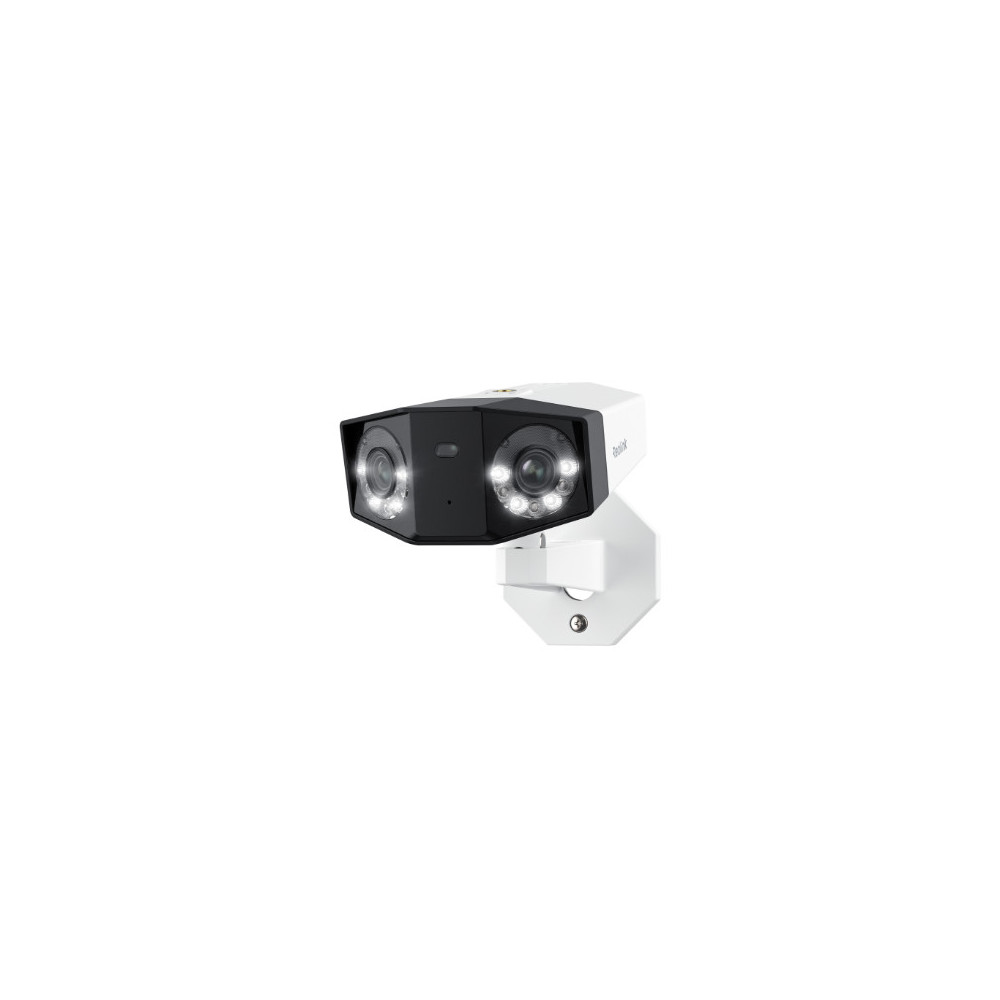



Source summary: 16MP Dual-Lens 180° View PoE Camera
Meta description: Reolink Duo 3 PoE is a dual-lens security camera with stunning 16MP UHD and 180° panoramic view. It features motion track, color night vision, smart detection, and two-way audio.
First 16MP UHD Dual-Lens PoE Security Camera with 180° Panoramic View
Groundbreaking 16MP UHD
180° Panorama
Motion Track
Spotlight Night Vision
Featuring two 4K image sensors, this dual-lens camera brings groundbreaking 16MP UHD clarity to you, ensuring no small detail goes unnoticed. Experience vivid imaging, even when monitoring a car passing by your front yard.
Experience a stunningly smooth and immersive view with Reolink Duo 3 PoE. Utilizing an advanced dual-image stitching algorithm, it combines images captured by the dual lenses to present a panoramic view free of distracting seams or disconnections. Now, bid farewell to blind spots and enjoy this complete, uninterrupted perspective.
Motion Track, a new feature from Reolink, summarizes 15 seconds of motion events into a single image, perfect for understanding recent activity faster than ever. All with real-time notifications for people, animals, and cars.
Enioy unparalleled nighttime visibility with the Reolink Duo 3 PoE. Featuring unmatched night vision technology, this camera lets you activate the built-in spotlights for vivid color night vision or switch to black-and-white night vision for discreet surveillance. Overcome the darkness and guarantee clear, reliable monitoring in any situation.Spotlight Night Vision Comparison
Power up Duo 3 PoE with only one network cable. Thanks to the advanced power over Ethernet technology, a single cable manages both data and a stable power supply, eliminating the need for multiple wires. Setting up this camera is effortless, even for beginners.
Accurately detect people, vehicles, and animals amidst other objects and send real-time alerts to you. Additionally, when swiftly passing cars or other targets are detected, the camera can take snapshots and send them to your email/FTP server.
When suspicious intruders are detected, the spotlight and siren will be triggered automatically, acting as powerful deterrents against crime.
With the built-in mic and speaker, you can engage in real-time conversation with your visitors or warn suspicious strangers to stay away. A direct yet highly effective feature.Note: When connected to RLN8-410 or RLN16-410, this feature is available only through the Reolink App/Client.
Reolink offers a Cloud service (available in select countries) , enabling you to save photos and videos of the devices to the Cloud for extra security and easy access. Enjoy encrypted storage, snapshots, and even access your recordings if your device goes offline. Peace of mind, wherever you are. .__reo_ubb_tips-container { position: relative; display: inline-block; line-height: 0; font-size: 0; width: min-content; vertical-align: text-top; } .__reo_ubb_tips-trigger { position: relative; display: inline-block; cursor: pointer; vertical-align: text-top; } .__reo_ubb_tips-font-size-18-12{ font-size: 18px; @media (max-width: 999px){ font-size: 12px; } } .__reo_ubb_tips-trigger:hover{ color: var(--b_6); } .__reo_ubb_tips-content { position: fixed; background-color: var(--white); color: var(--font_primary); font-size: 14px; font-weight: 500; line-height: 1.2; text-align: left; padding: 16px; border-radius: 5px; box-shadow: 0 4px 16px 0 rgba(0, 0, 0, 0.26); max-width: 280px; overflow-wrap: break-word; width: max-content; display: none; z-index: 10; } .__reo_ubb_tips-content[data-theme="dark"] { background-color: var(--black8); color: var(--font_primary_dark); }
Keep your captured images and footage safe with end-to-end encryption. Access your photos and videos anytime, anywhere.
Even if your device goes offline, you can still access the footage you saved on Reolink Cloud anytime. Stay connected to what matters.
Reolink Duo 3 PoE supports 24/7 continuous, motion-triggered, or scheduled recording. Store footage on a microSD card, Reolink NVR, or FTP server, all ensuring your privacy and control over stored data. With the H.265 video coding format, enjoy high-quality recordings in reduced file sizes, maximizing storage space without compromising quality.
Supports up to 512GB microSD card (sold separately). Safe and convenient.
If you want to save videos for a much longer time or have multiple cameras to operate, connecting this camera to a compatible Reolink NVR or security camera system is a better choice.
Easily observe hours, days, or even weeks of footage condensed into just a few captivating minutes.
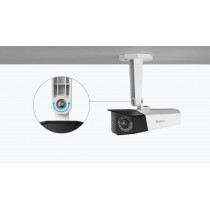
This camera offers great flexibility! Whether on the ceiling or against the wall, it adapts to suit your specific needs.
Built to be water resistant, this IP67-rated camera endures extreme weather conditions, way more durable than you'd imagine.
Receive real-time push notifications and emails when motion events occur, ensuring you stay in the know.
Effortlessly keep an eye on your property from anywhere. You can check the live feed on your mobile phone or PC via the Reolink App/Client.
Efficiently filter and search through saved videos based on event types and timelines. Locate the video footage you need as quickly as possible.
Tailor your motion detection zones to specific needs, focusing on key areas while reducing false alerts for enhanced accuracy.
As easy as saying "Hey Google, show me the backyard", you can check what's happening on the monitor. .__reo_ubb_tips-container { position: relative; display: inline-block; line-height: 0; font-size: 0; width: min-content; vertical-align: text-top; } .__reo_ubb_tips-trigger { position: relative; display: inline-block; cursor: pointer; vertical-align: text-top; } .__reo_ubb_tips-font-size-18-12{ font-size: 18px; @media (max-width: 999px){ font-size: 12px; } } .__reo_ubb_tips-trigger:hover{ color: var(--b_6); } .__reo_ubb_tips-content { position: fixed; background-color: var(--white); color: var(--font_primary); font-size: 14px; font-weight: 500; line-height: 1.2; text-align: left; padding: 16px; border-radius: 5px; box-shadow: 0 4px 16px 0 rgba(0, 0, 0, 0.26); max-width: 280px; overflow-wrap: break-word; width: max-content; display: none; z-index: 10; } .__reo_ubb_tips-content[data-theme="dark"] { background-color: var(--black8); color: var(--font_primary_dark); }
The main difference is resolution upgrade. The Duo 2 PoE is a 4K (8MP) dual-lens camera that delivers a wide 180° view for general home or business security. The Duo 3 PoE upgrades this to 16MP ultra-high resolution.
To install the Reolink Duo 3 PoE, mount the camera on a wall or ceiling using the included bracket and template, then connect it to a PoE switch, injector, or Reolink PoE NVR using a single Ethernet cable for both power and data. After securing and adjusting the angle, open the Reolink App, scan the QR code, and add the camera to complete setup.
Reolink PoE cameras typically use about 5–12W, with more advanced PTZ or multi-lens models reaching up to ~15–25W in some cases, depending on features and activity.
Yes, the Reolink Duo 3 PoE is fully wall-mountable using its included bracket, and it’s commonly installed on exterior walls or under eaves for wide-area surveillance.
1. You can mount the cam on the wall or on the ceiling. 2. You can loosen the screw to adjust the cam in any direction, and then tighten the screw to fix the cam.
How-to Videos
How to Add Your Reolink Camera to Synology Surveillance Station
How to Find Your IP Camera Address & Set up Remote Viewing
How to Set up Motion Detection via the Reolink App, Client, or NVR
You can use PayPal (available in 202 countries and 25 currencies) to purchase Reolink security products, or use credit or debit cards (Visa, MasterCard, American Express, Discover) directly without logging into your PayPal account. See details of Payment Policy.
Customs duties depend on where your items are shipped from and shipped to. See details in the Shipping Fees part of Shipping & Delivery Policy.
We sell security cameras to the United States, Germany, the United Kingdom and other dozens of countries.And we handle orders within 24 hours and pass the packages to our forwarders within 48 working hours. The delivery time varies due to where your items are shipped from and shipped to. See details of Shipping & Delivery Policy.
Yes, the camera works with Reolink IoT devices, including Reolink Floodlight PoE/WiFi. The specific functions supported depend on the camera.When Reolink Floodlight is linked to a camera, the floodlight and the built-in siren will be triggered once the camera detects an event. Click here to see how to link the camera to Reolink Floodlight.
Yes, the camera can support time-lapse. It can save time-lapse photos and videos to the SD card.How to Set Up Time Lapse?
Yes, currently, this camera can work with Google Assistant.Tips: How to add this camera to Google Assistant?
Yes, this PoE IP camera can work with Synology. There are 2 methods for you to save videos in it.Method 1 (recommended): You can add this camera to the Synology Surveillance Station. Check this article to learn how to add a camera. Method 2: You can treat your Synology device as an FTP server. For detailed steps, check How to Set up FTP for Reolink Products.
If you want to buy a new one: the currently on-sale NVRs work with all PoE and plug-in WiFi cameras including the Reolink Duo 3 PoE camera with the latest firmware version.If you already have one:Please first refer to this article for its hardware version.For the NVR with the hardware N7MB01, N6MB01, or N5MB01, it works with all PoE and plug-in WiFi cameras including the Reolink Duo 3 PoE camera with the latest firmware version.For the NVR with the hardware N2MB02, N3MB01, or H3MB18, it works with all PoE and plug-in WiFi cameras. But you can not have a full-resolution live view of the following cameras: Reolink Duo 3 PoE, RLC-1212A, RLC-1224A, Reolink Duo 2 PoE, Reolink Duo 2 WiFi, Reolink Duo Floodlight WiFi, Reolink Duo Floodlight PoE.For the NVR with the rest hardware such as H3MB17, H3MB02, and H3MB16, please refer to Introduction to Hardware Versions of Reolink NVRs for more detailed information. For all the compatible NVRs, we recommend you update their firmware version here before using them with the camera.
Motion Track captures the detected target's movement over a period of time and creates an image depicting its trajectory. You can receive the image via email in real time, eliminating the hassle of video downloads. Additionally, future firmware updates are expected to enable image creation based on selected movement duration in the Reolink App.